It's a Friday with six jobs running, and someone asks in the fleet's WhatsApp group: "who's free at four?" Three minutes go by with no answer because two drivers are on the road and can't check their phone, one has it muted, and the one who does reply gives a rough time because they don't know exactly how much of their current trip is left. The four o'clock job gets assigned anyway, blind, hoping it doesn't clash with another job carrying the same uncertainty.
- jobs running that Friday
- 6
- with no answer to "who's free at four?"
- 3 min
- drivers on the road, unable to check their phone
- 2
Why the WhatsApp group stops holding up
A WhatsApp group works reasonably well with two or three cars, where everyone knows each other and there's little room for confusion. It stops working once the usual symptoms show up: messages that get buried under other messages, a driver confirming a job that was already assigned to someone else, an availability question that takes a while to get answered because nobody's looking at the group right then. None of these failures are any one person's fault. It's the channel itself, built for conversation, that was never built to coordinate real-time operations.
WhatsApp group
- You ask "who's free?" and wait
- Availability is whatever each driver says, if they reply
- You assign whoever replied first
- A delay leaves only the driver's memory of it
Live map
- You look and already know
- The system knows who has an active job
- You see which car is closest to the pickup
- The car's position is kept for every moment of the job
From the group to a live map
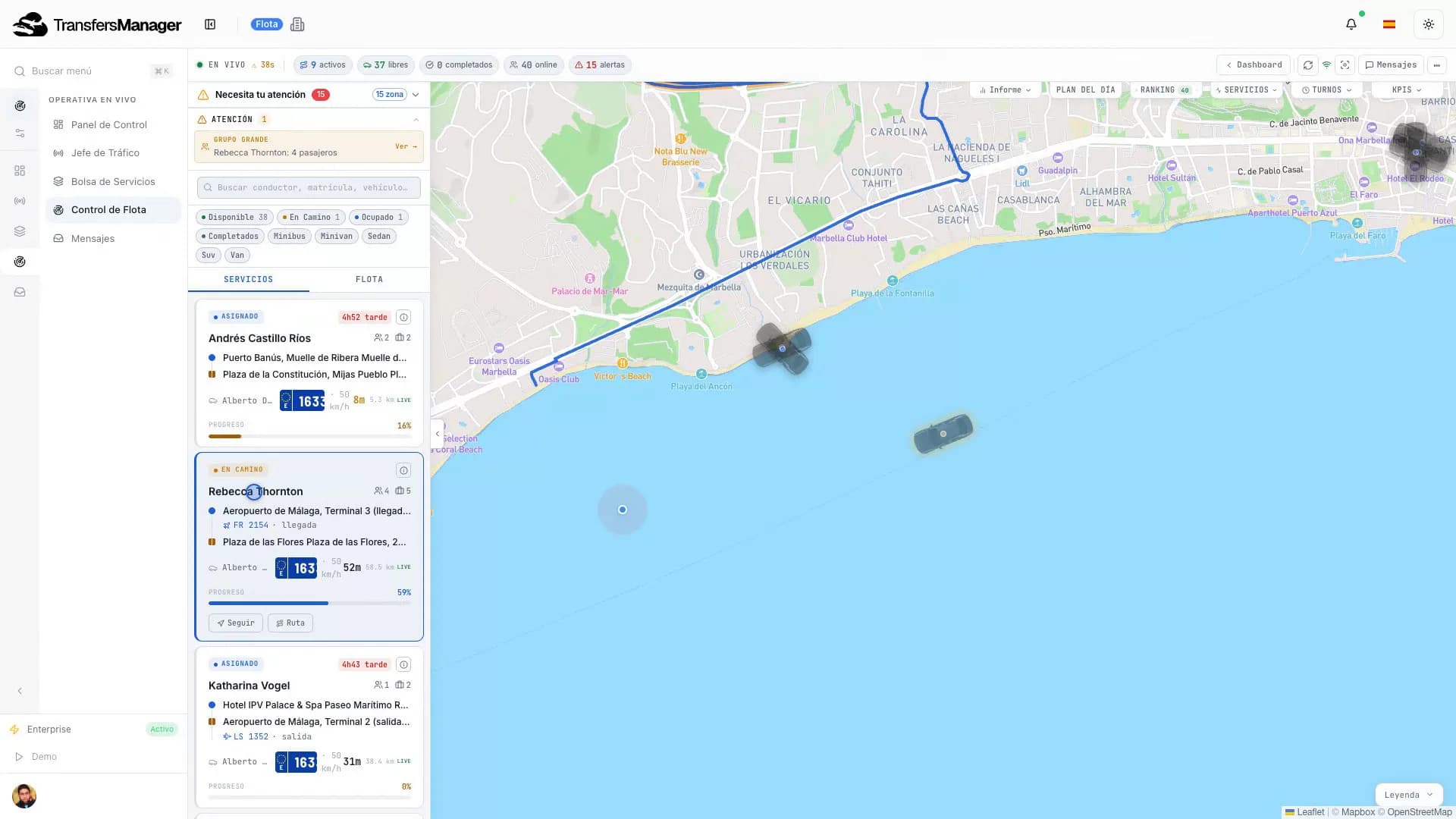
A live map replaces the "who's free?" question with an immediate visual answer: every vehicle's position, its status (free, en route to pickup, with a passenger, off duty) and the job it's assigned to, all on one screen. The difference isn't just cosmetic. It changes who has to do the work of finding something out: in the WhatsApp group, the dispatcher asks and waits; with the map, they look and already know.
Three things a live map solves that a message thread can't:
- Actual availability, not self-reported: the system knows whether a driver has an active job instead of relying on them to announce it.
- Geographic proximity: when assigning a new job, you see which vehicle is physically closest to the pickup point, not just who replied first.
- A position history per job: if there's an issue (a delay, a complaint about arrival time), there's a record of where the vehicle actually was at each point, not just the driver's memory of it.
Direct communication with each driver
The map solves the "where", but you still need to talk to the specific driver on a specific job without dropping that conversation into the general group, where everyone else sees it for no reason. Direct, per-job communication avoids two typical problems with a shared group: an instruction meant for one driver getting read by another by mistake, and a job's history getting mixed in with everyone else's when you need to review it later.
The driver app: their job sheet for the day
Before the app, a driver's job sheet for the day was literally that: a sheet, on paper or a screenshot, listing that day's assigned jobs, which had to be updated by hand every time something changed. The driver app replaces that with an always-current view showing:
- The day's assigned jobs, in order, with time, pickup point and destination.
- The passenger details needed for the job (name, flight number if relevant, number of seats, luggage).
- Direct navigation to the pickup point.
- One-tap status updates for each job (en route, at pickup, with passenger, completed), no phone call needed to report it.
That last part is what feeds the live map: nobody has to ask where each car is, because every driver is already reporting their status without even thinking about it, as a natural part of doing the job.
Every tap from the driver is a status on the map
1
En route
Heading to the pickup point.
The driver taps
On my wayThe map shows
Amber: on the way2
At pickup
Arrived and waiting for the passenger.
The driver taps
I have arrivedThe map shows
Blue: at pickup3
With passenger
The job is under way.
The driver taps
Passenger on boardThe map shows
Red: busy4
Completed
The car is free again.
The driver taps
Complete jobThe map shows
Green: free
What a dispatcher actually sees
Whoever is dispatching jobs needs a different view than the driver's: not one job at a time, but the whole operation at a glance. In practice, that means:
| What the dispatcher sees | What it's used for |
|---|---|
| A map with the whole fleet's position | Deciding which vehicle to assign a new or last-minute job to |
| A queue of unassigned jobs | Prioritizing what needs solving before it turns urgent |
| The status of every job in progress | Catching a delay before the passenger notices it |
| A communication history per driver and per job | Resolving an incident with data, not with memory |
With six cars, this view can be replaced with effort and constant attention. With fifteen or twenty, not having it isn't just inconvenient, it's the reason jobs start overlapping without anyone seeing it coming, the same warning sign described in detail in when a fleet outgrows WhatsApp and spreadsheets.
It scales differently than it feels like it should
With three or four cars, a dispatcher can hold the whole picture in their head, and a WhatsApp group barely gets in the way. The trouble is that the jump from "manageable by memory" to "impossible without a system" doesn't happen gradually. It tends to show up in a single bad week: two jobs assigned to the same driver by accident, a delay nobody caught until the passenger called to ask where the car was, a driver who genuinely didn't get the message because it scrolled past in a group with forty other messages that day. None of those are rare edge cases once a fleet passes a certain size; they're the default outcome of coordinating real-time operations through a channel built for chatting.
What to do next
If "where's the four o'clock car?" is still answered with a message to the group and a wait, the problem isn't your drivers' discipline, it's that the channel you're using was never built for this. The practical first step is having each driver report their status as a natural part of using their own app, not as extra work, and having that feed a live map anyone with dispatch access can check without asking.
GPS tracking and job assignment are part of the core features, along with the driver apps that feed them. If you're going to compare, do it with the rest of the signals in when a fleet outgrows WhatsApp in front of you: the map is usually the first one you notice, but it's rarely the only one.